Visual Studio Code for Linux 1.148.0
Microsoft's free code editor with built-in Git, debugging, IntelliSense and thousands of extensions. This is the official 64-bit Linux tar.gz.
Overview
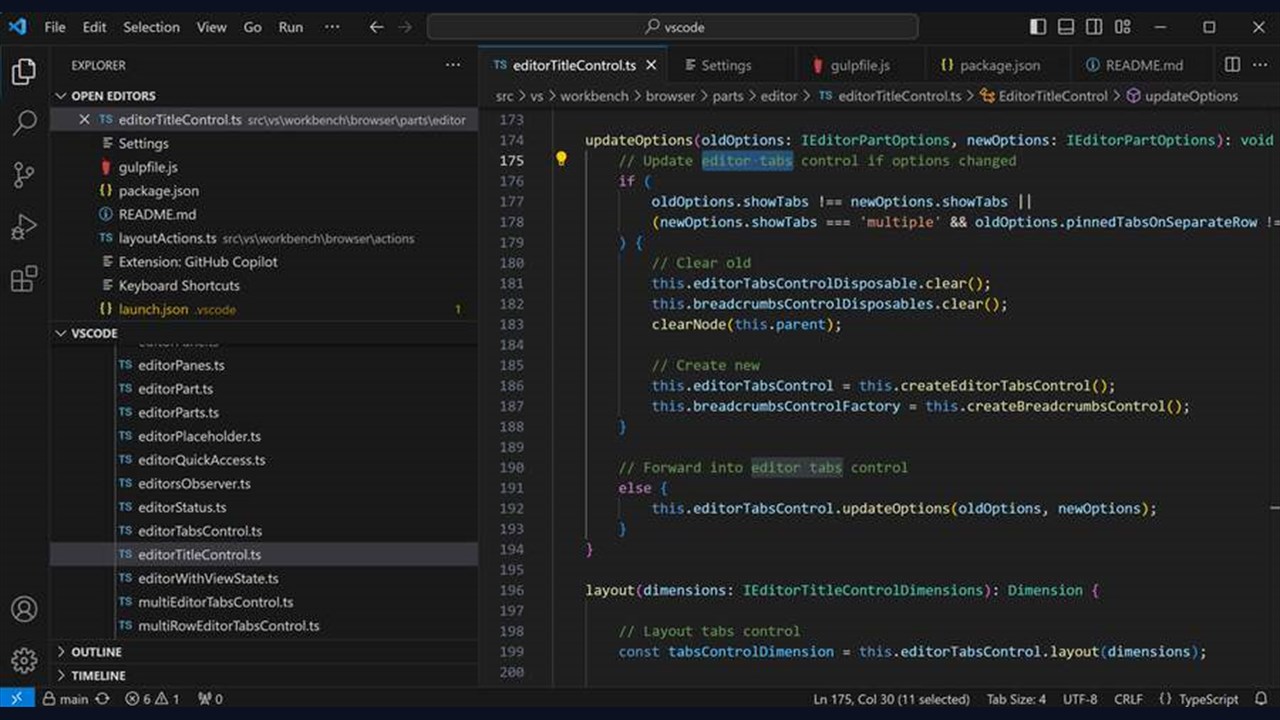
Visual Studio Code opens a folder as a project and shows its files in the Explorer on the left, with open editors listed above. The editor itself offers syntax colors, code completion, bracket matching and a minimap for long files. The status bar shows the current branch and problems, and the activity bar switches between search, source control, run and debug, and extensions. Settings and keyboard shortcuts can be changed in the editor. The program is free to use. The Linux download is a tar.gz archive: extract it and start the code binary inside, no installer needed. System Requirements OS: 64-bit Linux (x86_64) Source: the official Visual Studio Code download; the vendor lists its requirements on the VS Code website Download source: the official Visual Studio Code download server (stable 1.148.0, linux-x64 tar.gz).
Product Information
- Version: 1.148.0
- Platform: Linux
- File Size: 391.9 MB
- Developer: Microsoft
- License: Freeware
- Downloads: 0
Frequently Asked Questions
- Is Visual Studio Code for Linux safe to download from FileXD?
- Yes. Every release of Visual Studio Code for Linux 1.148.0 hosted on FileXD is malware-scanned and verified before publication with a clean direct download link.
- What is the latest version and file size of Visual Studio Code for Linux?
- The latest version available on FileXD is 1.148.0 with a file size of 391.9 MB.
- How do I download Visual Studio Code for Linux directly?
- Click the Direct Download button on the Visual Studio Code for Linux page on FileXD to download the verified installer directly at full speed with no registration required.
Direct Download Visual Studio Code for Linux 1.148.0