Piper for Linux 0.8
Piper for Linux: configure gaming mice - buttons, DPI and LEDs.
Overview
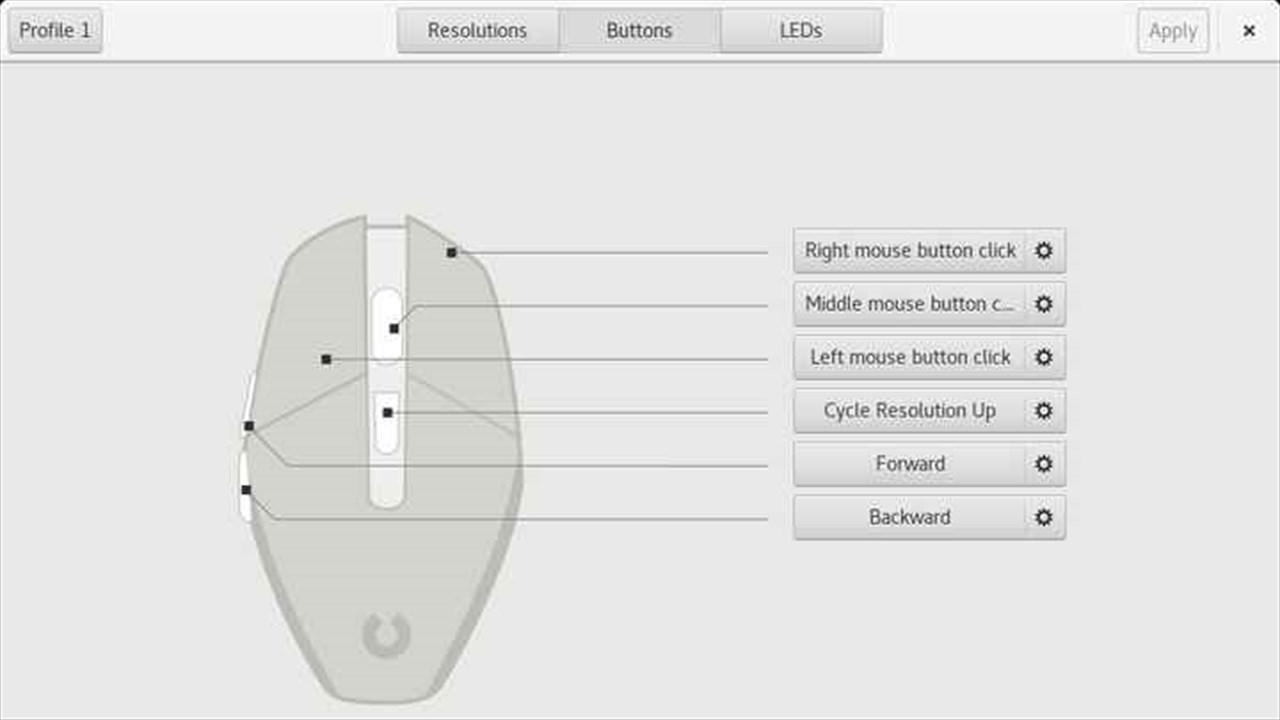
Piper is the graphical front end for libratbag, giving you full control over gaming mice on Linux. Remap every button with a click on the mouse diagram, set DPI levels and report rates per profile, and configure onboard LED effects where the hardware supports them. Profiles switch automatically or manually, and settings are written to the mouse onboard memory so they travel with the device. It supports a wide range of Logitech, Razer, SteelSeries and other gaming mice through libratbag drivers. Piper on Linux: the officially recommended distribution is the Flatpak. The download link below takes you to its listing on Flathub, which installs the current release with automatic updates on any distribution. System Requirements OS: Any 64-bit Linux distribution (Flatpak via Flathub) Size: About 2 MB installed via Flatpak License: Free / Open Source (GPL-2.0) Features: Button remapping, DPI and report rate control, LED configuration, per-device profiles, wide mouse support via libratbag Source: flathub.org/apps/org.freedesktop.Piper Download source: the official Flathub listing for Piper (org.freedesktop.Piper).
Product Information
- Version: 0.8
- Platform: Linux
- File Size: 2 MB
- Developer: libratbag developers
- License: Free / Open Source (GPL-2.0)
- Downloads: 0
Frequently Asked Questions
- Is Piper for Linux safe to download from FileXD?
- Yes. Every release of Piper for Linux 0.8 hosted on FileXD is malware-scanned and verified before publication with a clean direct download link.
- What is the latest version and file size of Piper for Linux?
- The latest version available on FileXD is 0.8 with a file size of 2 MB.
- How do I download Piper for Linux directly?
- Click the Direct Download button on the Piper for Linux page on FileXD to download the verified installer directly at full speed with no registration required.
Direct Download Piper for Linux 0.8