Notepad Next for Linux 0.15
A cross-platform, reimplemented Notepad++-style text editor with tabs, syntax highlighting and split views. This is the official Notepad Next AppImage for 64-bit Linux.
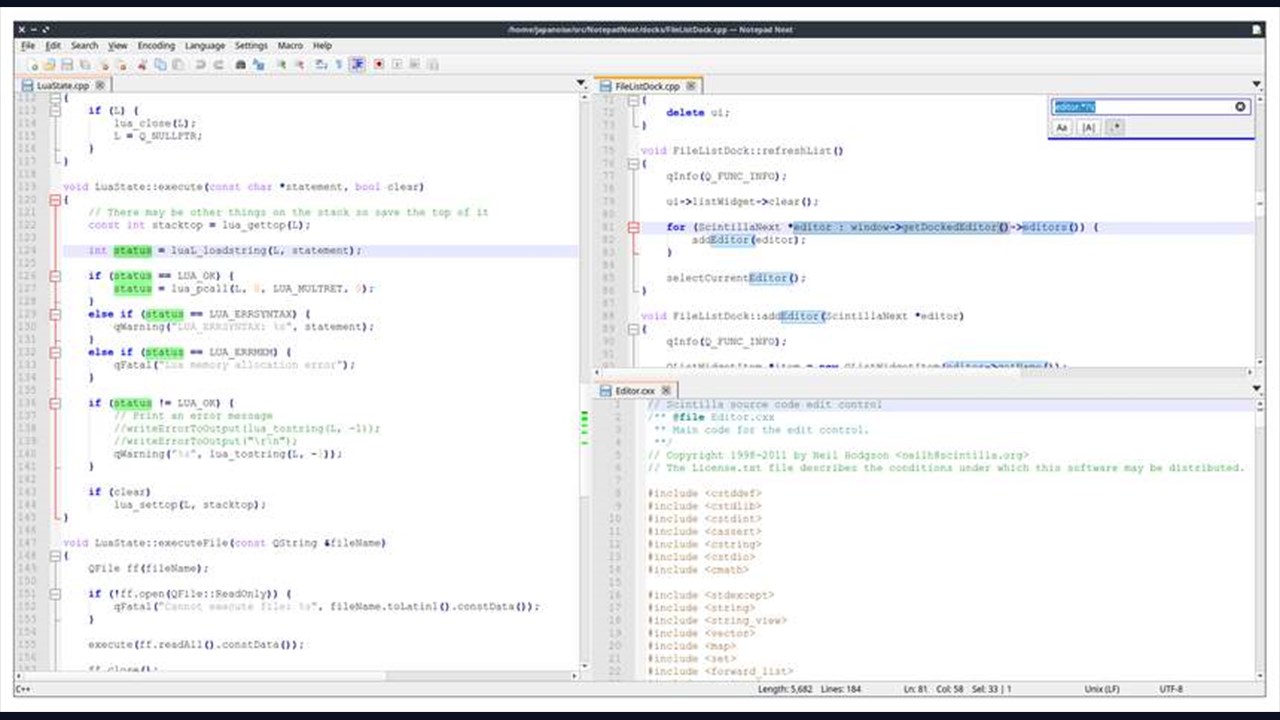
Overview
Notepad Next looks and feels like the editor many Windows users know. Open files sit in tabs, a document list and search results dock on the sides, and a status bar shows the line, column and encoding. It highlights dozens of languages, supports multiple selections, a find and replace with regular expressions, code folding, and a clone of a document into a second view. Recent sessions can be restored. Notepad Next is open source under the GPL and is not affiliated with Notepad++. The AppImage runs without installation. System Requirements OS: 64-bit Linux (x86_64) with a desktop that can run AppImages Source: the official Notepad Next release; the vendor publishes no further hardware list Download source: the official Notepad Next GitHub release (v0.15 AppImage).
Product Information
- Version: 0.15
- Platform: Linux
- File Size: 34.4 MB
- Developer: Justin Dailey
- License: Open Source
- Downloads: 0
Frequently Asked Questions
- Is Notepad Next for Linux safe to download from FileXD?
- Yes. Every release of Notepad Next for Linux 0.15 hosted on FileXD is malware-scanned and verified before publication with a clean direct download link.
- What is the latest version and file size of Notepad Next for Linux?
- The latest version available on FileXD is 0.15 with a file size of 34.4 MB.
- How do I download Notepad Next for Linux directly?
- Click the Direct Download button on the Notepad Next for Linux page on FileXD to download the verified installer directly at full speed with no registration required.
Direct Download Notepad Next for Linux 0.15