Chordcat for Linux 0.5.0
Chordcat for Linux: play chords on a MIDI keyboard and see them named instantly.
Overview
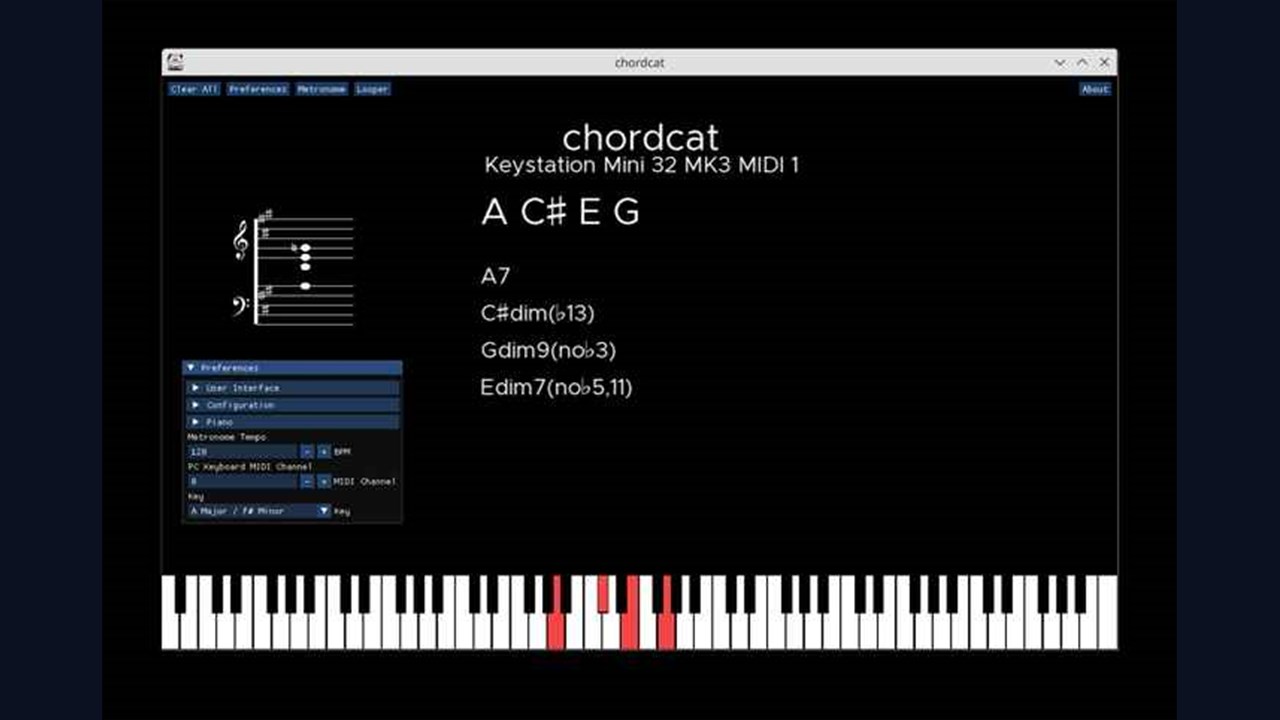
Chordcat listens to your MIDI keyboard and names what you play: press any combination of keys and the chord appears - major, minor, sevenths, extended and altered voicings - with the notes laid out on an on-screen piano. It is a fast companion for learning harmony, figuring out voicings by ear, and checking what that interesting cluster you stumbled onto is actually called. Multiple MIDI devices are supported and the note display follows inversions. Chordcat on Linux: the officially recommended distribution is the Flatpak. The download link below takes you to its listing on Flathub, which installs the current release with automatic updates on any distribution. System Requirements OS: Any 64-bit Linux distribution (Flatpak via Flathub) Size: About 15 MB installed via Flatpak License: Free / Open Source (GPL-3.0-only) Features: Real-time chord naming, MIDI keyboard input, on-screen piano, extended chord recognition, inversion display Source: flathub.org/apps/dev.ters.Chordcat Download source: Chordcat's official Linux channel: its listing on Flathub (dev.ters.Chordcat).
Product Information
- Version: 0.5.0
- Platform: Linux
- File Size: 15 MB
- Developer: Shriram Ravindranathan
- License: Free / Open Source (GPL-3.0-only)
- Downloads: 0
Frequently Asked Questions
- Is Chordcat for Linux safe to download from FileXD?
- Yes. Every release of Chordcat for Linux 0.5.0 hosted on FileXD is malware-scanned and verified before publication with a clean direct download link.
- What is the latest version and file size of Chordcat for Linux?
- The latest version available on FileXD is 0.5.0 with a file size of 15 MB.
- How do I download Chordcat for Linux directly?
- Click the Direct Download button on the Chordcat for Linux page on FileXD to download the verified installer directly at full speed with no registration required.
Direct Download Chordcat for Linux 0.5.0